前情提要
本文主要内容是介绍我使用AI编程工具配合wpcode插件实现WordPress系统邮件通知的问题,我将介绍如何通过AI和WordPress插件wpcode,把自己的邮箱配置在WordPress后台,给自己发系统通知,最后会把我使用的代码分享出来,有需要的可以直接拿走使用。
我的痛点
我有时会在WordPress博客后台设置一些任务,比如爬虫记录总结,在第二天要收到前一天的爬虫记录,或者想在第一时间看到网站的留言信息,这时候就需要一些通知,邮件是比较容易设置的,但是很多插件都是收费的,或者设置复杂。现在AI工具这么先进,我就使用AI工具去设计了这个一个不算工具的小工具,全程只需要复制粘贴,简单配置邮箱认证信息即可。除了使用AI,还需要配合wpcode插件
神奇的wpcode插件
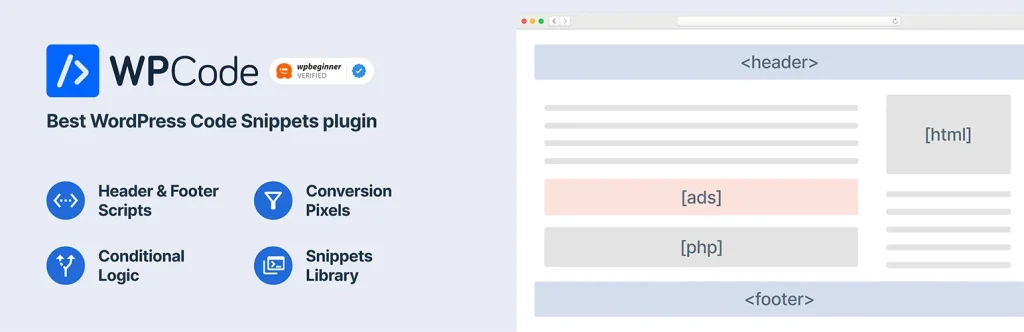
wpcode插件是一个功能特别强大的插件,网上有很多相关的介绍,总结一句话就是:这一个插件可以实现你能想到的80%以上的插件功能。因为它可以让你自定义代码并进行管理,很多插件的功能都可以通过wpcode自定义代码进行实现。当然这可能会劝退一些人,毕竟不懂代码,还是有现成的插件是最好的,但是现在有了AI,这就让这个插件变得更加好用,毕竟代码的问题,我们交给deepseek、Kimi、豆包这些AI工具就可以轻松解决。
AI工具的使用
博主不会写代码,也看不懂代码,所以我通过以上提到的AI工具进行提问,因为我之前安装过相关邮件的插件,我知道要在后台设置邮箱需要一些必要的信息,比如SMTP、授权码、邮箱服务器地址等,我就提前收集了相关的信息并交给AI:
1.我想要在WordPress实现邮件通知功能
2.我已经安装了wpcode插件,请你帮我设计一个工具帮我配置邮箱
3.我的邮箱地址是:httpsguo@126.com
4.SMTP服务器: smtp.126.com
5.授权码是:xxxxxxxxxxxxx
6.我没有看到端口信息,你帮我配置即可
把以上信息交给AI,你就会得到一段代码,把代码复制到wpcode插件中就可以,代码安装步骤参考以下图片
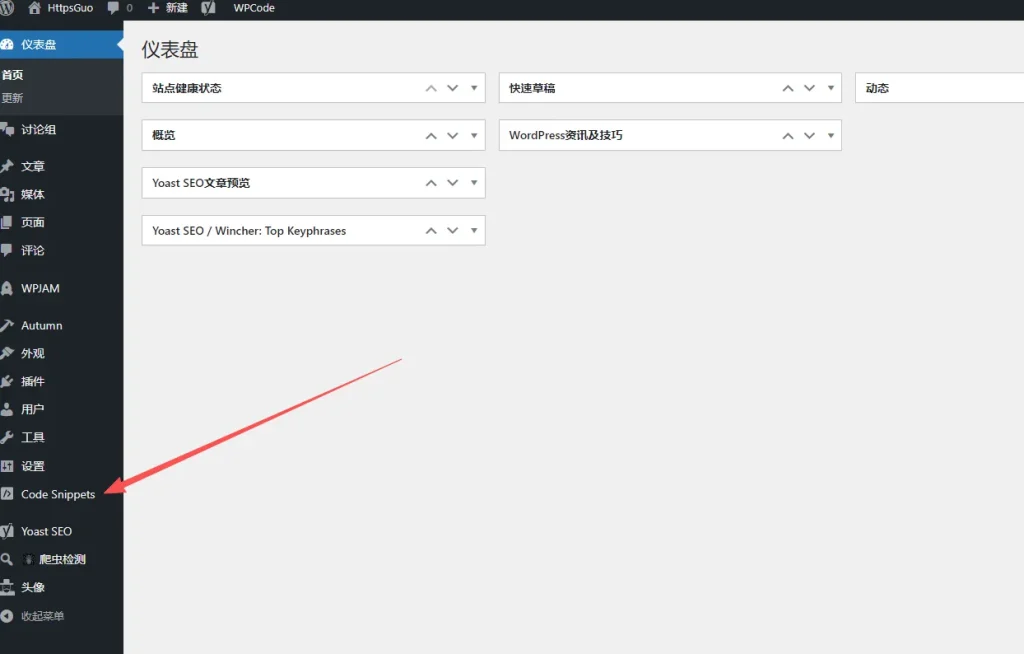
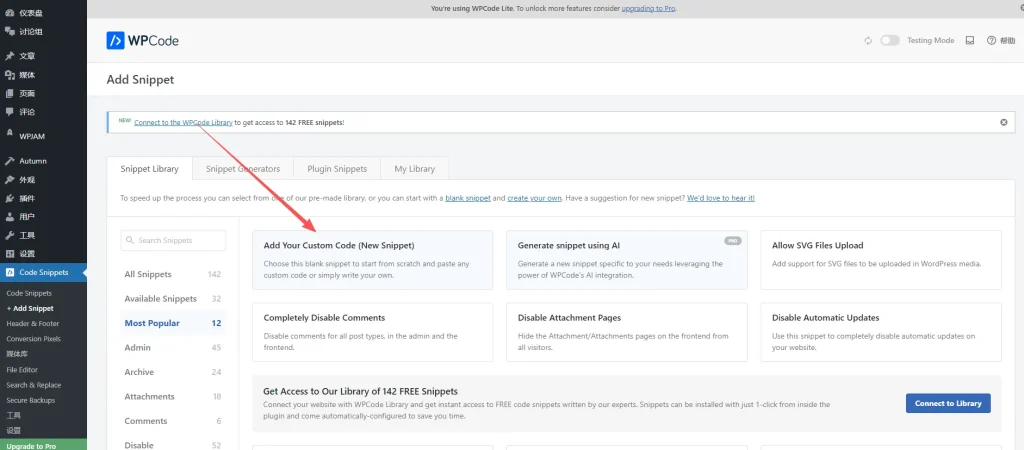
1.安装wpcode插件并激活以后,打开插件按钮
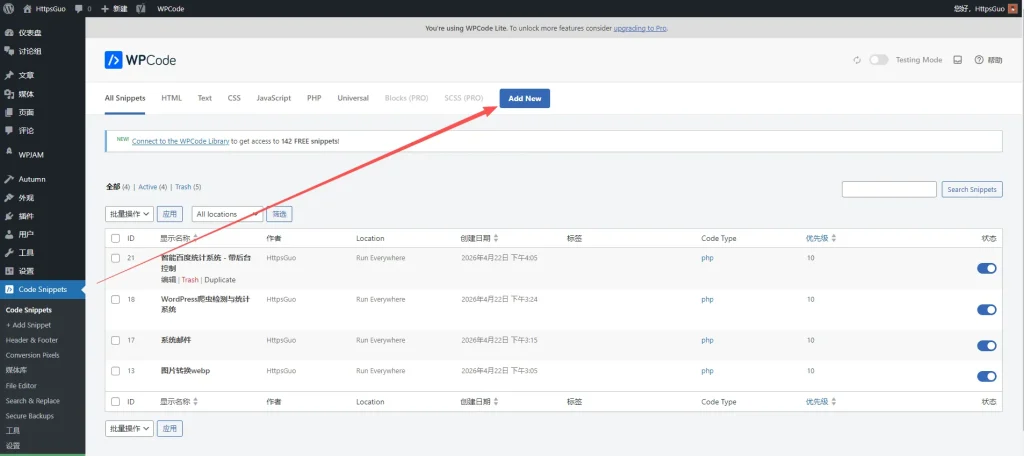
2.点击Add New
3.点击Add Your Custom Code (New Snippet)
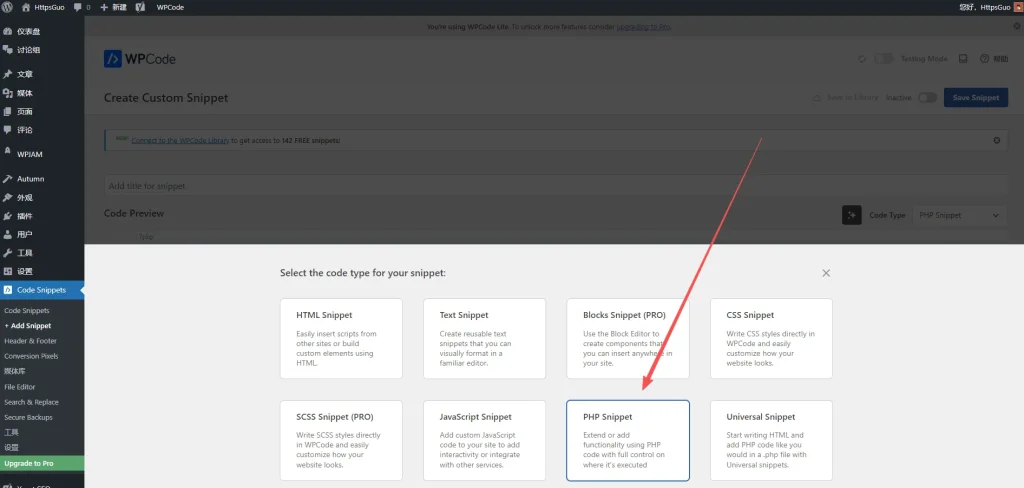
4.稍等一下会有一个弹出页面,弹出以后点击PHP(也可以选择HTML等其他选项,看你的AI给你的代码是那个类型的)
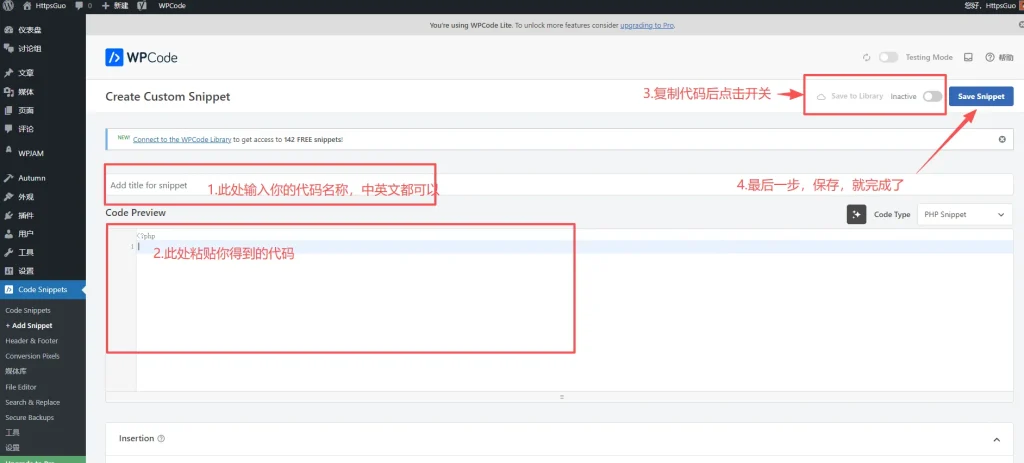
5.按照图片的顺序进行设置,就大功告成
邮箱的配置(网易邮箱为例)
邮箱的配置是最简单的,以网易邮箱为例,登录邮箱后,进入设置页面,开启SMTP服务,会自动给你一个授权码,如果你已经开启过,选择下面的新增授权码,注意这个授权码只显示一次,请复制保存到其他地方暂时保管
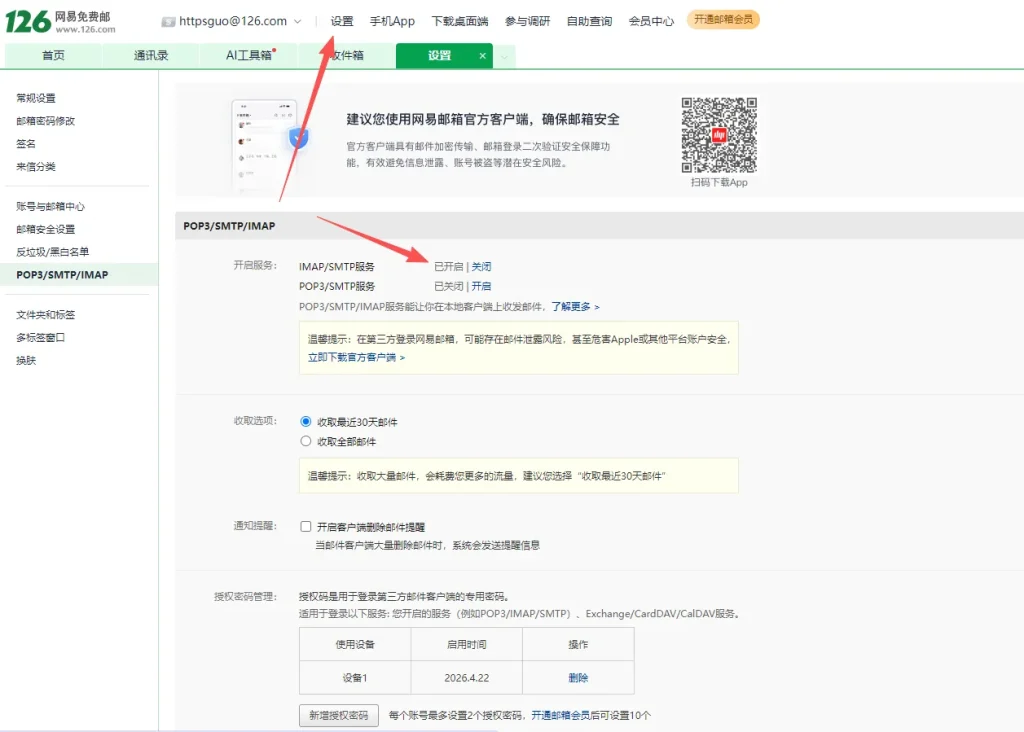
开启SMTP服务并得到授权码以后,记住下面的SMTP服务器,如果你是163邮箱,就是smtp.163.com,如果你是126邮箱,就是smtp.126.com,在设置页面都可以看得到
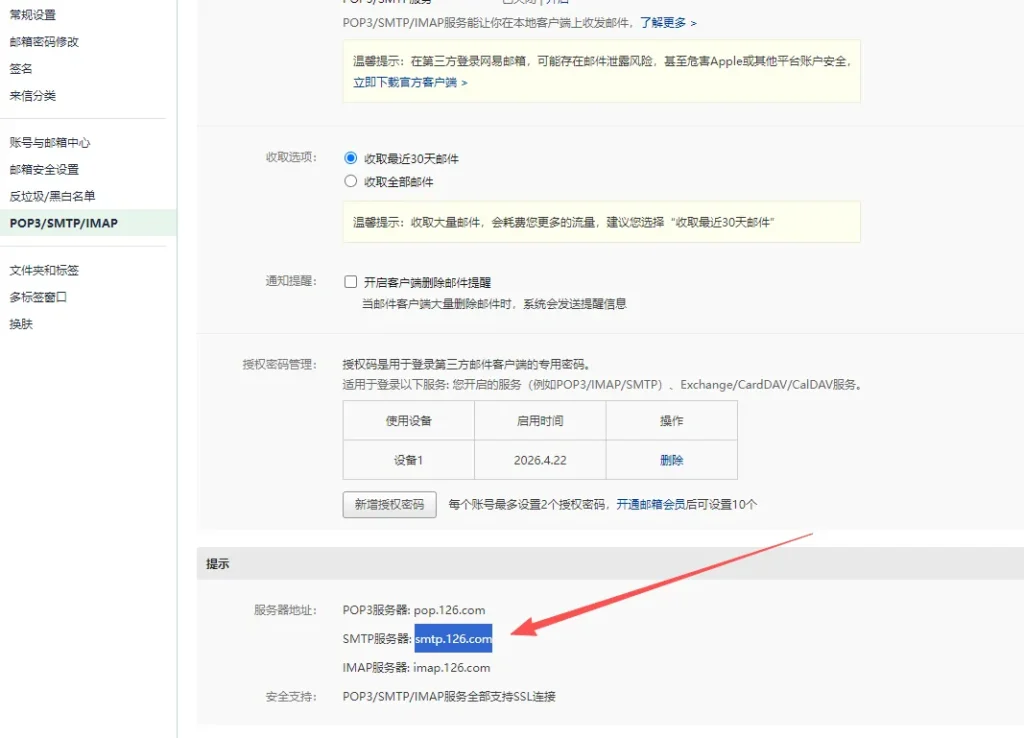
到此就基本结束了邮箱信息的收集,你可以提交给AI进行代码创建了,以下是我的代码实现的功能
效果展示
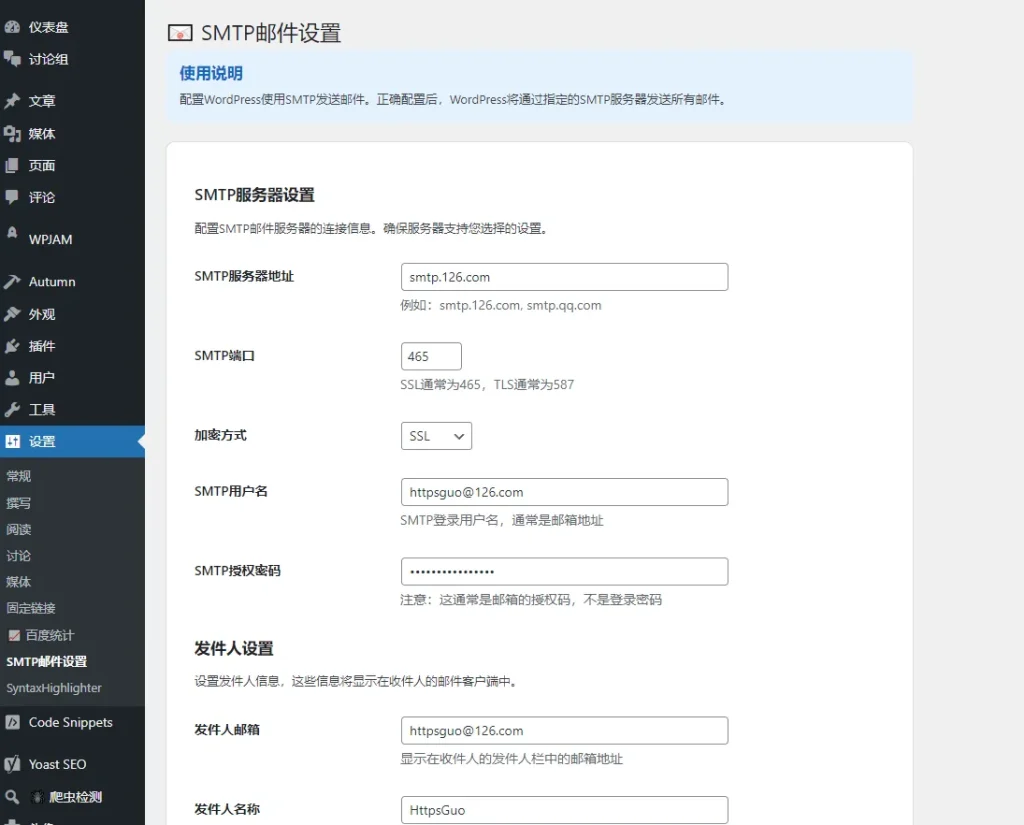
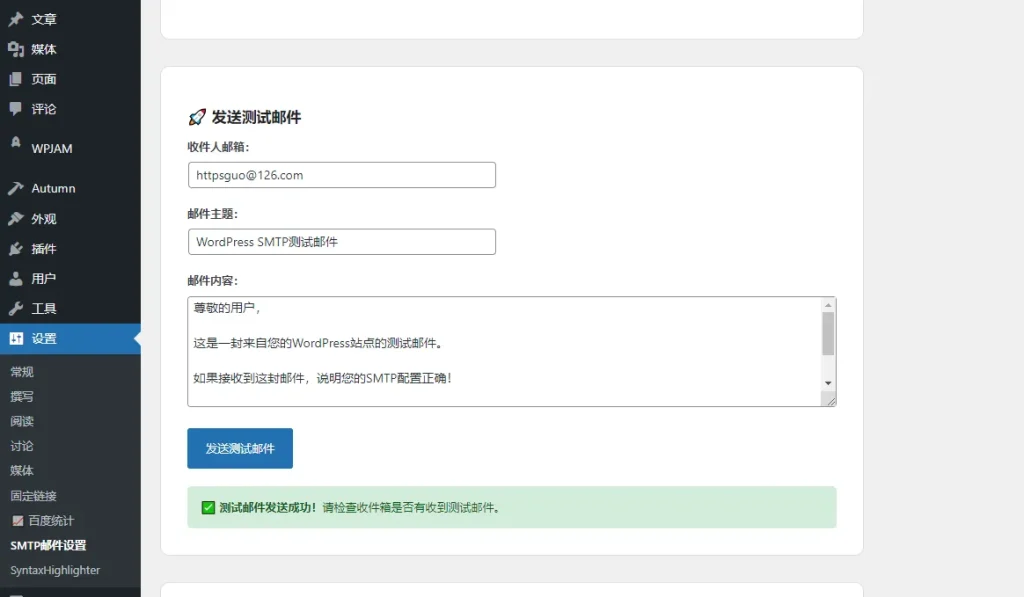
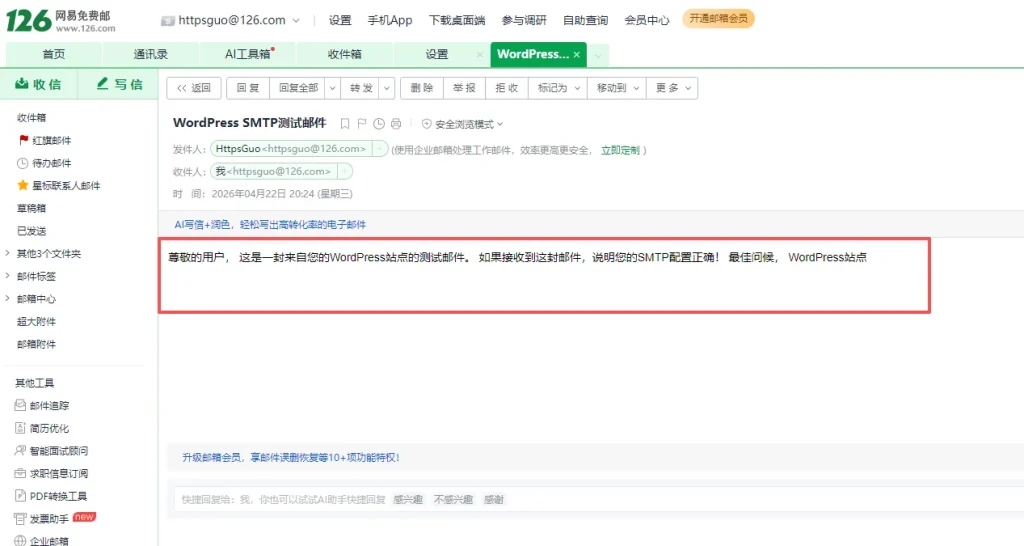
代码展示(可直接复制使用)
/**
 * WordPress SMTP邮件功能设置页面
 * 使用WPCode插件添加此代码
 */

// 注册设置
add_action('admin_init', 'register_email_smtp_settings');
function register_email_smtp_settings() {
    // 注册SMTP相关设置选项
    register_setting('email_smtp_settings_group', 'smtp_host');
    register_setting('email_smtp_settings_group', 'smtp_port');
    register_setting('email_smtp_settings_group', 'smtp_username');
    register_setting('email_smtp_settings_group', 'smtp_password');
    register_setting('email_smtp_settings_group', 'smtp_secure');
    register_setting('email_smtp_settings_group', 'smtp_from_email');
    register_setting('email_smtp_settings_group', 'smtp_from_name');
    register_setting('email_smtp_settings_group', 'smtp_default_recipient');
    register_setting('email_smtp_settings_group', 'smtp_enable_logging');

    // 设置区域
    add_settings_section(
        'email_smtp_main_section',
        'SMTP服务器设置',
        'email_smtp_main_section_callback',
        'email-smtp-settings'
    );

    add_settings_section(
        'email_smtp_from_section',
        '发件人设置',
        'email_smtp_from_section_callback',
        'email-smtp-settings'
    );

    add_settings_section(
        'email_smtp_test_section',
        '测试邮件设置',
        'email_smtp_test_section_callback',
        'email-smtp-settings'
    );

    // SMTP服务器字段
    add_settings_field(
        'smtp_host', 'SMTP服务器地址',
        'smtp_host_field_callback', 'email-smtp-settings', 'email_smtp_main_section'
    );

    add_settings_field(
        'smtp_port', 'SMTP端口',
        'smtp_port_field_callback', 'email-smtp-settings', 'email_smtp_main_section'
    );

    add_settings_field(
        'smtp_secure', '加密方式',
        'smtp_secure_field_callback', 'email-smtp-settings', 'email_smtp_main_section'
    );

    add_settings_field(
        'smtp_username', 'SMTP用户名',
        'smtp_username_field_callback', 'email-smtp-settings', 'email_smtp_main_section'
    );

    add_settings_field(
        'smtp_password', 'SMTP授权密码',
        'smtp_password_field_callback', 'email-smtp-settings', 'email_smtp_main_section'
    );

    // 发件人字段
    add_settings_field(
        'smtp_from_email', '发件人邮箱',
        'smtp_from_email_field_callback', 'email-smtp-settings', 'email_smtp_from_section'
    );

    add_settings_field(
        'smtp_from_name', '发件人名称',
        'smtp_from_name_field_callback', 'email-smtp-settings', 'email_smtp_from_section'
    );

    // 测试设置字段
    add_settings_field(
        'smtp_default_recipient', '默认收件人邮箱',
        'smtp_default_recipient_field_callback', 'email-smtp-settings', 'email_smtp_test_section'
    );

    add_settings_field(
        'smtp_enable_logging', '启用日志记录',
        'smtp_enable_logging_field_callback', 'email-smtp-settings', 'email_smtp_test_section'
    );
}

// 设置区域说明
function email_smtp_main_section_callback() {
    echo '<p>配置SMTP邮件服务器的连接信息。确保服务器支持您选择的设置。</p>';
}

function email_smtp_from_section_callback() {
    echo '<p>设置发件人信息,这些信息将显示在收件人的邮件客户端中。</p>';
}

function email_smtp_test_section_callback() {
    echo '<p>设置测试邮件的默认收件人和一些功能选项。</p>';
}

// 设置字段回调函数
function smtp_host_field_callback() {
    $value = esc_attr(get_option('smtp_host', 'smtp.126.com'));
    echo '<input type="text" name="smtp_host" value="' . $value . '" class="regular-text">';
    echo '<p class="description">例如:smtp.126.com, smtp.qq.com</p>';
}

function smtp_port_field_callback() {
    $value = esc_attr(get_option('smtp_port', '465'));
    echo '<input type="number" name="smtp_port" value="' . $value . '" class="small-text">';
    echo '<p class="description">SSL通常为465,TLS通常为587</p>';
}

function smtp_secure_field_callback() {
    $value = esc_attr(get_option('smtp_secure', 'ssl'));
    $options = array('ssl' => 'SSL', 'tls' => 'TLS', 'none' => '无加密');

    echo '<select name="smtp_secure">';
    foreach ($options as $key => $label) {
        $selected = selected($value, $key, false);
        echo '<option value="' . $key . '" ' . $selected . '>' . $label . '</option>';
    }
    echo '</select>';
}

function smtp_username_field_callback() {
    $value = esc_attr(get_option('smtp_username', 'httpsguo@126.com'));
    echo '<input type="text" name="smtp_username" value="' . $value . '" class="regular-text">';
    echo '<p class="description">SMTP登录用户名,通常是邮箱地址</p>';
}

function smtp_password_field_callback() {
    $value = esc_attr(get_option('smtp_password', 'RAcBHjywFGXXPkDw'));
    echo '<input type="password" name="smtp_password" value="' . $value . '" class="regular-text" autocomplete="new-password">';
    echo '<p class="description">注意:这通常是邮箱的授权码,不是登录密码</p>';
}

function smtp_from_email_field_callback() {
    $value = esc_attr(get_option('smtp_from_email', 'httpsguo@126.com'));
    echo '<input type="email" name="smtp_from_email" value="' . $value . '" class="regular-text">';
    echo '<p class="description">显示在收件人的发件人栏中的邮箱地址</p>';
}

function smtp_from_name_field_callback() {
    $value = esc_attr(get_option('smtp_from_name', 'WordPress站点'));
    echo '<input type="text" name="smtp_from_name" value="' . $value . '" class="regular-text">';
    echo '<p class="description">显示在收件人的发件人栏中的名称</p>';
}

function smtp_default_recipient_field_callback() {
    $value = esc_attr(get_option('smtp_default_recipient', 'httpsguo@163.com'));
    echo '<input type="email" name="smtp_default_recipient" value="' . $value . '" class="regular-text">';
    echo '<p class="description">测试邮件的默认收件人地址</p>';
}

function smtp_enable_logging_field_callback() {
    $value = esc_attr(get_option('smtp_enable_logging', '1'));
    echo '<label><input type="checkbox" name="smtp_enable_logging" value="1" ' . checked($value, '1', false) . '> 启用邮件发送日志记录</label>';
    echo '<p class="description">记录邮件发送状态,便于故障排查</p>';
}

// 添加管理菜单页面
add_action('admin_menu', 'add_email_smtp_admin_page');
function add_email_smtp_admin_page() {
    add_options_page(
        'SMTP邮件设置',
        'SMTP邮件设置',
        'manage_options',
        'email-smtp-settings',
        'email_smtp_settings_page'
    );
}

// 创建设置页面
function email_smtp_settings_page() {
    ?>
    <div class="wrap">
        <h1>📧 SMTP邮件设置</h1>

        <div style="max-width: 800px;">
            <div style="background: #e3f2fd; padding: 15px; border-radius: 8px; margin-bottom: 20px;">
                <h3 style="margin: 0 0 10px 0; color: #1565c0;">使用说明</h3>
                <p style="margin: 0;">配置WordPress使用SMTP发送邮件。正确配置后,WordPress将通过指定的SMTP服务器发送所有邮件。</p>
            </div>

            <!-- 设置表单 -->
            <form method="post" action="options.php" style="background: white; padding: 30px; border-radius: 10px; border: 1px solid #ddd;">
                <?php
                settings_fields('email_smtp_settings_group');
                do_settings_sections('email-smtp-settings');
                submit_button('保存设置', 'primary');
                ?>
            </form>

            <!-- 测试邮件表单 -->
            <div style="background: white; padding: 30px; border-radius: 10px; border: 1px solid #ddd; margin-top: 30px;">
                <h2>🚀 发送测试邮件</h2>
                <form method="post" id="test-email-form">
                    <div style="margin-bottom: 20px;">
                        <label style="display: block; margin-bottom: 8px; font-weight: 600;">收件人邮箱:</label>
                        <input type="email" name="test_recipient"
                               value="<?php echo esc_attr(get_option('smtp_default_recipient', 'httpsguo@163.com')); ?>"
                               class="regular-text" required>
                    </div>

                    <div style="margin-bottom: 20px;">
                        <label style="display: block; margin-bottom: 8px; font-weight: 600;">邮件主题:</label>
                        <input type="text" name="test_subject" value="WordPress SMTP测试邮件" class="regular-text" required>
                    </div>

                    <div style="margin-bottom: 20px;">
                        <label style="display: block; margin-bottom: 8px; font-weight: 600;">邮件内容:</label>
                        <textarea name="test_message" rows="6" class="large-text" style="width: 100%;" required>
尊敬的用户,

这是一封来自您的WordPress站点的测试邮件。

如果接收到这封邮件,说明您的SMTP配置正确!

最佳问候,
WordPress站点
                        </textarea>
                    </div>

                    <input type="submit" name="send_test_email" value="发送测试邮件"
                           class="button button-primary" style="padding: 8px 20px;">
                </form>

                <?php
                if (isset($_POST['send_test_email'])) {
                    $recipient = sanitize_email($_POST['test_recipient']);
                    $subject = sanitize_text_field($_POST['test_subject']);
                    $message = wp_kses_post($_POST['test_message']);

                    $result = wp_mail($recipient, $subject, $message);

                    if ($result) {
                        echo '<div style="background: #d4edda; color: #155724; padding: 15px; border-radius: 5px; margin-top: 20px;">
                                <strong>✅ 测试邮件发送成功!</strong>请检查收件箱是否有收到测试邮件。
                              </div>';
                    } else {
                        echo '<div style="background: #f8d7da; color: #721c24; padding: 15px; border-radius: 5px; margin-top: 20px;">
                                <strong>❌ 测试邮件发送失败!</strong>
                              </div>';
                    }
                }
                ?>
            </div>

            <!-- 服务器状态 -->
            <div style="background: white; padding: 30px; border-radius: 10px; border: 1px solid #ddd; margin-top: 30px;">
                <h2>📋 配置状态检测</h2>
                <div style="display: grid; grid-template-columns: repeat(auto-fit, minmax(250px, 1fr)); gap: 15px;">
                    <?php
                    $host = get_option('smtp_host');
                    $port = get_option('smtp_port');
                    $username = get_option('smtp_username');
                    $password = get_option('smtp_password');
                    $from_email = get_option('smtp_from_email');
                    $from_name = get_option('smtp_from_name');

                    echo '<div style="background: #f0f9ff; padding: 15px; border-radius: 8px; border-left: 4px solid #2196f3;">
                            <strong>SMTP服务器:</strong><br>' . ($host ? '✅ ' . esc_html($host) : '❌ 未配置') . '</div>';

                    echo '<div style="background: #f0f9ff; padding: 15px; border-radius: 8px; border-left: 4px solid #2196f3;">
                            <strong>端口号:</strong><br>' . ($port ? '✅ ' . esc_html($port) : '❌ 未配置') . '</div>';

                    echo '<div style="background: #f0f9ff; padding: 15px; border-radius: 8px; border-left: 4px solid #2196f3;">
                            <strong>用户名:</strong><br>' . ($username ? '✅ 已配置' : '❌ 未配置') . '</div>';

                    echo '<div style="background: #f0f9ff; padding: 15px; border-radius: 8px; border-left: 4px solid #2196f3;">
                            <strong>授权密码:</strong><br>' . ($password ? '✅ 已配置' : '❌ 未配置') . '</div>';

                    echo '<div style="background: #f0f9ff; padding: 15px; border-radius: 8px; border-left: 4px solid #2196f3;">
                            <strong>发件人邮箱:</strong><br>' . ($from_email ? '✅ ' . esc_html($from_email) : '❌ 未配置') . '</div>';

                    echo '<div style="background: #f0f9ff; padding: 15px; border-radius: 8px; border-left: 4px solid #2196f3;">
                            <strong>发件人名称:</strong><br>' . ($from_name ? '✅ ' . esc_html($from_name) : '❌ 未配置') . '</div>';
                    ?>
                </div>

                <div style="background: #f8f9fa; padding: 15px; border-radius: 5px; margin-top: 20px;">
                    <strong>常用SMTP服务器配置:</strong>
                    <ul style="margin: 10px 0 0 20px;">
                        <li><strong>126邮箱:</strong>服务器 smtp.126.com,端口 465 (SSL)</li>
                        <li><strong>QQ邮箱:</strong>服务器 smtp.qq.com,端口 465 (SSL)</li>
                        <li><strong>163邮箱:</strong>服务器 smtp.163.com,端口 465 (SSL)</li>
                        <li><strong>Gmail:</strong>服务器 smtp.gmail.com,端口 587 (TLS)</li>
                    </ul>
                </div>
            </div>
        </div>
    </div>
    <?php
}

// 更新SMTP邮件配置函数
add_action('phpmailer_init', 'custom_smtp_config_dynamic');
function custom_smtp_config_dynamic($phpmailer) {
    $host = get_option('smtp_host', '你的SMTP服务器');
    $port = get_option('smtp_port', '465');
    $username = get_option('smtp_username', '你的邮箱地址');
    $password = get_option('smtp_password', '你的授权码');
    $secure = get_option('smtp_secure', 'ssl');
    $from_email = get_option('smtp_from_email', '你的邮箱地址');
    $from_name = get_option('smtp_from_name', 'WordPress站点');

    if (!empty($host) && !empty($username) && !empty($password)) {
        $phpmailer->isSMTP();
        $phpmailer->Host = $host;
        $phpmailer->SMTPAuth = true;
        $phpmailer->Port = $port;
        $phpmailer->Username = $username;
        $phpmailer->Password = $password;

        if ($secure !== 'none') {
            $phpmailer->SMTPSecure = $secure;
        }

        $phpmailer->From = $from_email;
        $phpmailer->FromName = $from_name;
        $phpmailer->CharSet = 'UTF-8';
        $phpmailer->isHTML(true);
    }
}

// 日志记录功能
if (get_option('smtp_enable_logging', '1')) {
    add_action('wp_mail_succeeded', 'log_email_success');
    add_action('wp_mail_failed', 'log_email_failure');
}

function log_email_success($mail_data) {
    $log_message = sprintf(
        '[%s] 邮件发送成功 - 收件人: %s, 主题: %s',
        date('Y-m-d H:i:s'),
        implode(', ', $mail_data['to']),
        $mail_data['subject']
    );
    error_log('SMTP邮件日志: ' . $log_message);
}

function log_email_failure($mail_error) {
    $error = $mail_error->get_error_message();
    $log_message = sprintf(
        '[%s] 邮件发送失败 - 错误: %s',
        date('Y-m-d H:i:s'),
        $error
    );
    error_log('SMTP邮件日志: ' . $log_message);
}

// 添加自定义邮件发送函数(增强版)
function send_custom_email_enhanced($to_email, $subject, $message, $is_html = true) {
    $headers = array();

    if ($is_html) {
        $headers[] = 'Content-Type: text/html; charset=UTF-8';
    }

    // 添加发件人信息
    $from_email = get_option('smtp_from_email', '发件人地址');
    $from_name = get_option('smtp_from_name', 'WordPress站点');
    $headers[] = 'From: ' . $from_name . ' <' . $from_email . '>';

    return wp_mail($to_email, $subject, $message, $headers);
}

// 为了方便使用,创建一个短代码来测试邮件
add_shortcode('smtp_test_form', 'smtp_test_form_shortcode');
function smtp_test_form_shortcode() {
    ob_start();
    ?>
    <div style="max-width: 500px; margin: 0 auto; padding: 20px; background: #f9f9f9; border-radius: 10px;">
        <h3 style="text-align: center; color: #333;">📧 SMTP邮件测试</h3>
        <form method="post" style="display: flex; flex-direction: column; gap: 15px;">
            <div>
                <label style="display: block; margin-bottom: 5px; font-weight: 600;">收件人邮箱:</label>
                <input type="email" name="test_email"
                       value="<?php echo esc_attr(get_option('smtp_default_recipient', '收件人地址')); ?>"
                       style="width: 100%; padding: 10px; border: 1px solid #ddd; border-radius: 5px;" required />
            </div>
            <div>
                <label style="display: block; margin-bottom: 5px; font-weight: 600;">邮件主题:</label>
                <input type="text" name="test_subject" value="SMTP配置测试"
                       style="width: 100%; padding: 10px; border: 1px solid #ddd; border-radius: 5px;" required />
            </div>
            <div>
                <label style="display: block; margin-bottom: 5px; font-weight: 600;">邮件内容:</label>
                <textarea name="test_message" rows="5"
                          style="width: 100%; padding: 10px; border: 1px solid #ddd; border-radius: 5px;" required>
测试邮件内容
                </textarea>
            </div>
            <input type="submit" name="send_test_email" value="📤 发送测试邮件"
                   style="background: #667eea; color: white; padding: 12px; border: none; border-radius: 5px; cursor: pointer; font-size: 16px;" />
        </form>
        <?php
        if (isset($_POST['send_test_email'])) {
            $to = sanitize_email($_POST['test_email']);
            $subject = sanitize_text_field($_POST['test_subject']);
            $message = wp_kses_post($_POST['test_message']);

            $result = send_custom_email_enhanced($to, $subject, $message);

            if ($result) {
                echo '<div style="background: #d4edda; color: #155724; padding: 15px; border-radius: 5px; margin-top: 15px; text-align: center;">✅ 邮件发送成功!</div>';
            } else {
                echo '<div style="background: #f8d7da; color: #721c24; padding: 15px; border-radius: 5px; margin-top: 15px; text-align: center;">❌ 邮件发送失败!</div>';
            }
        }
        ?>
    </div>
    <?php
    return ob_get_clean();
}
相关邮箱配置如果不明白的,可以留言或者发送邮件给我。

暂无评论